






Admission message
MSH, EVN, PID, PV1
Health Informatics Guide
A Beginner's Guide to Reading Healthcare Messages
This quick-start guide helps beginners understand the basic structure of HL7 v2 messages, identify key sections, and know where to find important information - no programming experience required.
AI assistance disclosure:
Some explanations and sample messages were drafted with AI assistance. The final guide was reviewed, edited, and organized by the author. All examples are simulated for educational use.
01
HL7 v2 is a healthcare messaging standard used to exchange information between healthcare systems.
HL7 v2 messages may be used when:
Think of HL7 v2 as a structured text message that one healthcare system sends to another.
02
An HL7 v2 message has four main building blocks:
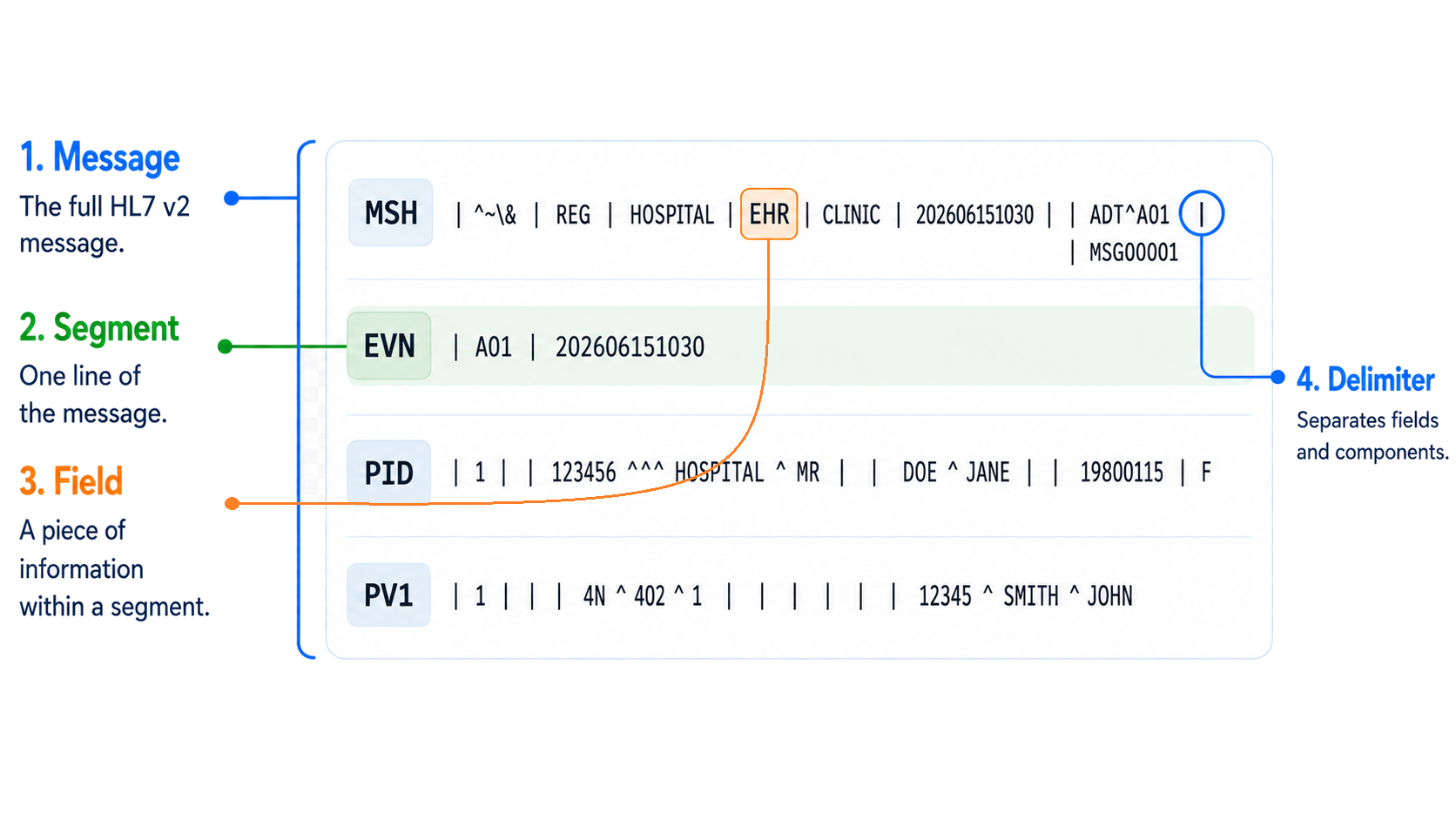
In this example, the whole board is the message, each row is a segment, highlighted
values are fields, and symbols such as | separate the parts.
03
Each line in an HL7 v2 message is called a segment.
The first three letters of each line are the Segment ID.
| Segment | Stands For | Meaning |
|---|---|---|
MSH |
Message Header | What type of message is this? |
EVN |
Event Type | What event triggered the message? |
PID |
Patient Identification | Who is the patient? |
PV1 |
Patient Visit | What visit or encounter is this? |
ORC |
Common Order | What order was placed? |
OBR |
Observation Request | What test or observation was requested? |
OBX |
Observation Result | What was the result? |
AL1 |
Allergy Information | Does the patient have allergies? |
Not every HL7 v2 message contains all of these segments. Required and optional segments depend on the message type.
04
A field is one piece of information inside a segment.
Fields are separated by the pipe symbol:
|MSH|^~\&|REG|HOSPITAL|EHR|CLINIC|202606151030||ADT^A01|MSG00001|P|2.5.1| Field | Value | Meaning |
|---|---|---|
MSH-1 | | | Field separator |
MSH-2 | ^~\& | Encoding characters |
MSH-3 | REG | Sending application |
MSH-4 | HOSPITAL | Sending facility |
MSH-5 | EHR | Receiving application |
MSH-6 | CLINIC | Receiving facility |
MSH-7 | 202606151030 | Message date/time |
MSH-8 | blank | Security |
MSH-9 | ADT^A01 | Message type |
MSH-10 | MSG00001 | Message control ID |
MSH-11 | P | Processing ID |
MSH-12 | 2.5.1 | HL7 version |
This means:
The message was sent from REG at HOSPITAL.
The message was sent to EHR at CLINIC.
The message type is ADT^A01.
The message ID is MSG00001.
The HL7 version is 2.5.1.
MSH has a total of 21 fields in HL7 v2.5.1, but not all fields
are used in every message. In ...|202606151030||ADT^A01|..., the
|| means MSH-8 is blank.
05
HL7 v2 uses symbols called delimiters to separate information.
The most important delimiter is:
| = field separatorPID|1||123456^^^HOSPITAL^MR||DOE^JANE||19800115|FEach | separates one field from the next.
|Field separatorSeparates fields^Component separatorSeparates smaller parts inside a field~Repetition separatorShows repeated values\Escape characterAllows special characters to be used as text&Subcomponent separatorSeparates even smaller parts||Blank fieldA field has no value^^Blank componentA component has no valueDo not try to memorize every field. First, learn how to split the message into parts.
06
Use this sample message:
MSH|^~\&|REG|HOSPITAL|EHR|CLINIC|202606151030||ADT^A01|MSG00001|P|2.5.1EVN|A01|202606151030PID|1||123456^^^HOSPITAL^MR||DOE^JANE||19800115|FPV1|1|I|4N^402^1||||12345^SMITH^JOHNThis is a simulated message and does not contain real patient information.
Each line starts with a three-letter segment ID.
MSHMessage informationEVNEvent informationPIDPatient informationPV1Visit informationLook at the MSH segment:
MSH|^~\&|REG|HOSPITAL|EHR|CLINIC|202606151030||ADT^A01|MSG00001|P|2.5.1Look at the PID segment:
PID|1||123456^^^HOSPITAL^MR||DOE^JANE||19800115|FThe patient information shown here is simulated sample data only. Do not paste real patient information into public online tools.
This tells us:
The patient is Jane Doe.
The patient ID is 123456.
The date of birth is 1980-01-15.
The administrative sex is Female.Look at the PV1 segment:
PV1|1|I|4N^402^1||||12345^SMITH^JOHNI = Inpatient4N / 402 / 1 = unit, room, bed12345^SMITH^JOHN = attending doctorThis tells us:
The patient is an inpatient.
The location is 4N, room 402, bed 1.
The attending doctor is John Smith.07
Use the simulated HL7 v2 message below. You can paste this sample into an HL7 viewer and use an HL7 field definition reference to complete the blanks.
Use these references to break the message into segments, fields, and components.
This is simulated educational data. Do not paste real patient information into public online tools.
08
This guide is only a starting point. To build deeper knowledge, use reliable references.
A helpful textbook reference is Principles of Health Interoperability: FHIR, HL7 and SNOMED CT by Tim Benson and Grahame Grieve. (Chapter 7)
Chapter 7 provides context for understanding HL7 v2 within healthcare interoperability standards.
Caristix is an electronic dictionary for HL7 v2 message types, trigger events, segments, fields, data types, and tables.
Note: accessing Caristix HL7 Definition may require account registration.
Choose the HL7 version
-> Search the segment ID
-> Open the field list
-> Match the field numberThe official HL7 standard is the most complete and authoritative reference.
Note: accessing some official HL7 materials may require account registration.
HL7 viewer tools can help you break a message into readable parts: segments, fields, components, repeated values, and blank fields.
Do not paste real patient information into public online tools.Only use real patient data in tools approved by your organization.